Best AI Tools for Students in 2026: Top AI Tools for Studying, Research, Writing & Productivity

AI tools have become one of the most useful technologies for students in 2026. From explaining difficult topics and summarizing lengthy chapters to helping with research, presentations, coding, writing, and exam preparation, artificial intelligence can make studying faster and more organized.
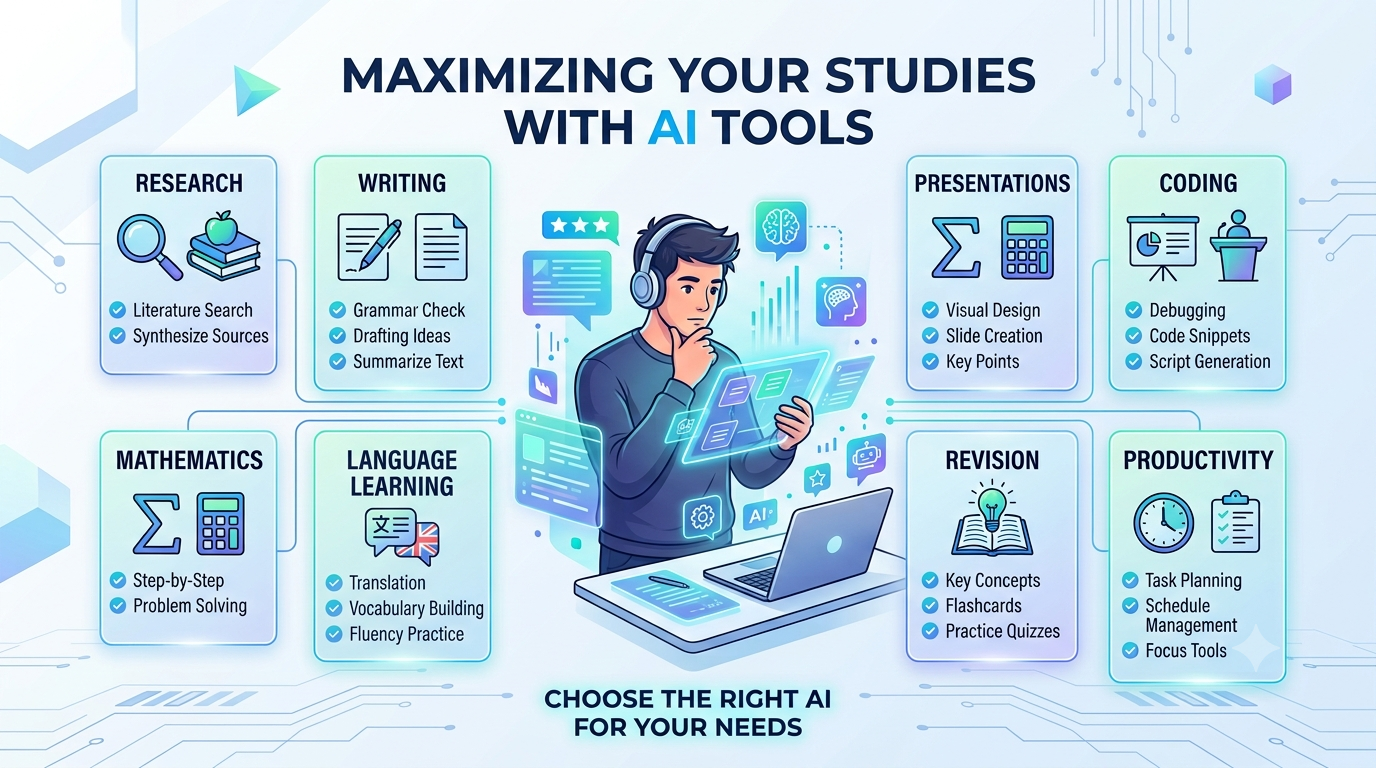
However, having access to hundreds of AI tools can also make choosing the right one difficult. Some tools are excellent for research, while others are better for writing, mathematics, coding, note-taking, or creating presentations.
In this guide, we will look at the best AI tools for students in 2026, what each tool does best, its advantages and limitations, and how students can use AI responsibly without replacing their own learning.
Why Should Students Use AI Tools in 2026?

Traditional studying usually involves textbooks, handwritten notes, Google searches, and hours of research. AI doesn't necessarily replace these methods, but it can make them more efficient.
For example, imagine you are studying a difficult chapter in physics. Instead of spending 30 minutes searching for a simple explanation, you can ask an AI assistant to explain the concept in beginner-friendly language.
Similarly, if you have a long research paper to read, an AI-powered research tool can help you understand the key ideas faster.
Some of the most useful applications of AI for students include:
• Understanding difficult concepts
• Creating study plans
• Summarizing notes
• Researching academic topics
• Improving writing
• Checking grammar
• Preparing presentations
• Learning languages
• Practicing mathematics
• Learning programming
• Preparing for exams
• Organizing study materials
• Generating practice questions
The key is to use AI as a study assistant, not as a replacement for learning.
1. ChatGPT – Best Overall AI Tool for Students
When discussing the best AI tools for students, ChatGPT is one of the most versatile options available.
Students can use it for brainstorming, explanations, writing assistance, coding help, mathematics, language learning, exam preparation, and much more.
One of its biggest advantages is that students can ask follow-up questions. If the first explanation is too complicated, you can ask the AI to explain the same concept using simpler words or examples.
Best Uses of ChatGPT
• Explaining difficult subjects
• Creating study schedules
• Generating practice questions
• Brainstorming project ideas
• Learning programming
• Improving writing
• Preparing interview questions
• Creating revision notes
• Language practice
Example
Instead of asking:
"Explain photosynthesis."
A student could ask:
"Explain photosynthesis like I'm a beginner, then give me five exam-style questions."
This produces a much more useful learning session.
Pros
✓Extremely versatile
✓Easy to use
✓Useful for many subjects
✓Can explain concepts in different ways
✓Helpful for coding and problem-solving
Cons
×AI-generated answers can sometimes contain mistakes
×Students should verify important academic information
×It should not be used to submit generated assignments as original work
Best for: Almost every type of student.
2. Google Gemini – Best for Google Ecosystem Users
Google Gemini is another powerful AI assistant that students can use for research, brainstorming, writing, learning, and everyday productivity.
Its biggest advantage is its connection with Google's ecosystem and its ability to work with different types of information.
Students can use Gemini to understand concepts, generate ideas, create study materials, summarize information, and assist with projects.
Useful Student Applications
• Research assistance
• Writing improvement
• Brainstorming
• Study planning
• Coding
• Summarization
• Language learning
• Question answering
Gemini can be especially useful for students who already use Google services regularly.
Best for: Students who want an AI assistant that fits naturally into a Google-centered workflow.
3. Perplexity – Best AI Search Engine for Research

Research is an important part of college and university life. This is where Perplexity can be particularly useful.
Instead of simply providing a list of search results, Perplexity is designed to provide conversational answers and cite sources.
For students, this can make the initial research stage much faster.
What Students Can Use Perplexity For
• Research topics
• Finding sources
• Understanding current events
• Exploring academic subjects
• Comparing concepts
• Finding additional reading material
For example, if you are preparing a project about renewable energy, you can ask Perplexity to explain recent developments and provide sources for further reading.
However, students should still open and read the original sources instead of blindly trusting an AI-generated summary.
Best for: Research and information discovery.
4. NotebookLM – Best for Studying Your Own Documents

NotebookLM is particularly interesting for students because it can help them work with their own study materials.
Instead of asking a general AI about a subject, students can provide relevant documents and use the AI to understand those materials.
This can be useful when preparing for exams.
For example, you could organize lecture notes, study documents, or other permitted course materials and then ask questions about them.
Useful Features for Students
• Summarizing documents
• Asking questions about uploaded materials
• Creating study guides
• Understanding complex information
• Reviewing notes
• Generating questions from study material
The biggest benefit is that the student's study material becomes the center of the learning process.
Best for: Students who have lots of PDFs, notes, and study documents.
5. Grammarly – Best AI Writing Assistant
Writing assignments, essays, reports, emails, and applications can be challenging, especially when English is not your first language.
Grammarly can help students improve grammar, spelling, clarity, and overall writing quality.
Instead of completely generating an assignment, students can use it to improve their own writing.
Grammarly Can Help With
• Grammar
• Spelling
• Sentence clarity
• Writing tone
• Word choice
• Basic proofreading
For students, this is particularly useful when preparing academic documents or professional applications.
Best for: Improving English writing and proofreading.
6. Canva AI – Best for Presentations and Projects

Presentations are a regular part of school and college projects. Canva's AI-powered features can help students create designs, presentations, posters, graphics, and other visual materials.
A student doesn't need to be an expert graphic designer to create a professional-looking presentation.
Students Can Create
• PowerPoint-style presentations
• Posters
• Infographics
• Study diagrams
• Social media graphics
• Project covers
• Educational visuals
The important thing is to make sure that the information in the presentation is accurate and that the final work reflects the student's understanding.
Best for: Presentations and visual projects.
7. Wolfram Alpha – Best for Mathematics and Calculations

Mathematics can become much easier when students have tools that can show how problems are solved.
Wolfram Alpha is widely known for computational and mathematical capabilities. It can be useful for students studying algebra, calculus, statistics, physics, and other technical subjects.
Instead of simply looking for the final answer, students should use such tools to understand the process.
Useful For
• Algebra
• Calculus
• Statistics
• Equations
• Graphs
• Scientific calculations
• Physics-related calculations
Best for: Mathematics, science, and technical calculations.
8. GitHub Copilot – Best AI Tool for Coding Students
Programming students can benefit significantly from AI coding assistants.
GitHub Copilot can assist developers by suggesting code and helping them work through programming tasks.
For students learning programming, it can be useful when they are stuck on a concept or trying to understand how a particular coding pattern works.
Programming Students Can Use AI For
• Code suggestions
• Debugging
• Understanding code
• Learning programming concepts
• Creating examples
• Exploring different approaches
However, beginners should avoid copying AI-generated code without understanding it.
If you don't understand the code, you haven't really learned the programming concept.
Best for: Computer science and programming students.
9. Quizlet – Best for Flashcards and Revision
Quizlet is useful for students who prefer learning through flashcards and quick revision.
AI-powered learning features can help turn study material into useful revision resources.
Students can use flashcards to memorize:
• Vocabulary
• Definitions
• Historical dates
• Scientific terms
• Formulas
• Important concepts
Flashcards work especially well when students regularly review information instead of trying to memorize everything the night before an exam.
Best for: Memorization and quick revision.
10. Notion AI – Best for Student Organization
Students often struggle with organization rather than a lack of information.
Notion can help students organize notes, assignments, projects, deadlines, and study plans in one digital workspace.
With AI features, students can also work with their notes and turn information into more organized content.
Students Can Use Notion For
Class notes
Assignment tracking
Study schedules
Project planning
To-do lists
Research organization
Best for: Productivity and organization.
11. Claude – Best for Long-Form Writing and Analysis
Claude is another AI assistant that can be useful for students.
It can help with brainstorming, explaining concepts, analyzing text, summarizing information, and improving written work.
Students working on long reports or research-related projects may find an AI assistant useful during the planning and editing stages.
Good Uses
• Brainstorming
• Summarization
• Writing improvement
• Text analysis
• Coding assistance
• Research planning
As with other AI systems, students should verify important information before using it academically.
Best for: Writing, analysis, and long documents.
12. Otter.ai – Best for Lecture Transcription
Students sometimes struggle to listen to a lecture and take detailed notes at the same time.
AI transcription tools such as Otter.ai can help turn spoken discussions or lectures into text, where appropriate and with permission.
This can make reviewing information easier after class.
Potential Uses
• Lecture notes
• Meeting transcription
• Discussion summaries
• Interview transcription
• Review material
Students should always respect their institution's rules and get appropriate permission before recording lectures or other people.
Best for: Lecture notes and transcription.
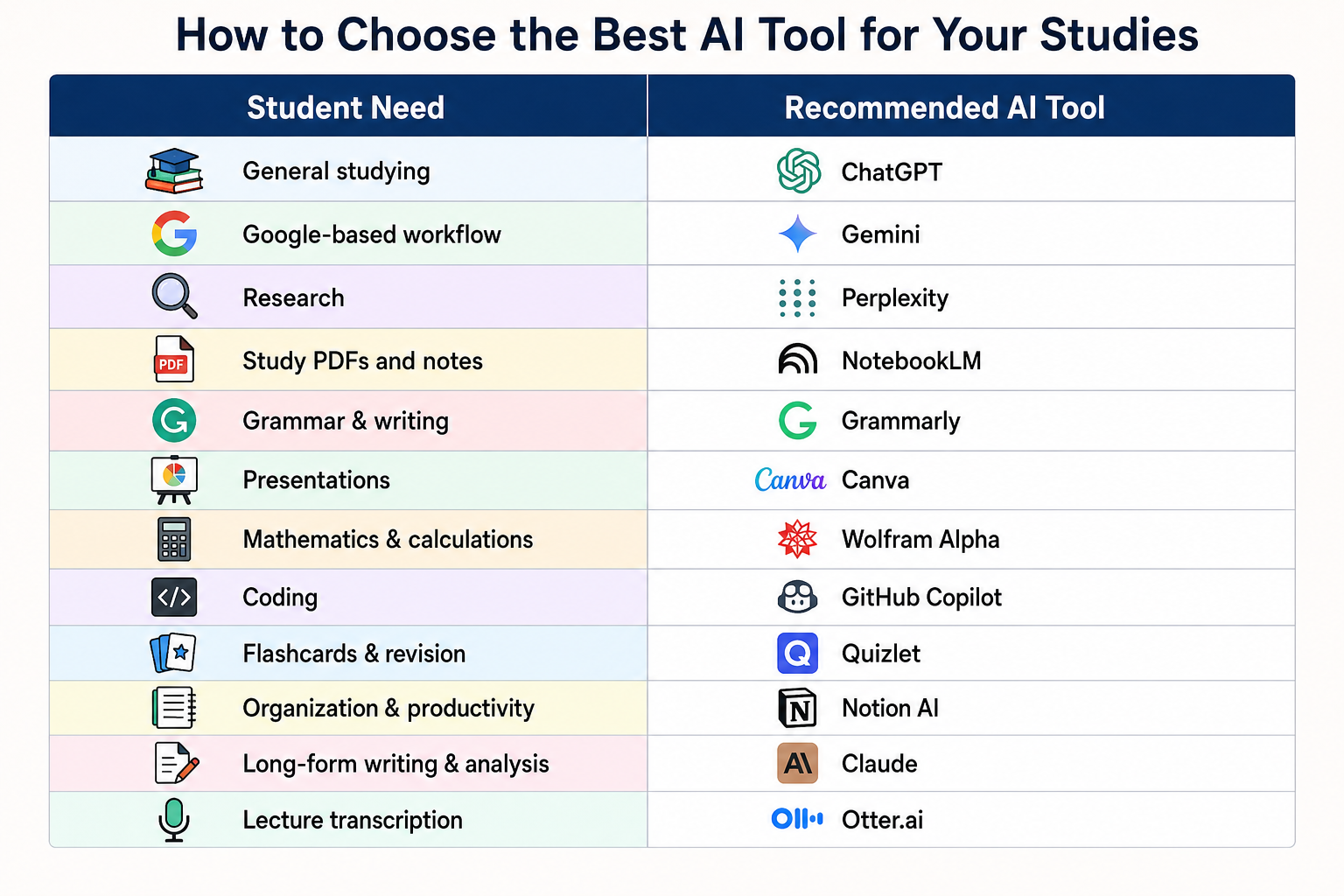
How to Choose the Best AI Tool for Your Studies
There isn't one AI tool that is perfect for every student.
The right tool depends on what you are trying to accomplish.
How Students Can Use AI Without Becoming Dependent on It

AI is powerful, but using it incorrectly can hurt your learning.
Imagine a student receives a homework assignment and immediately asks an AI tool to generate the complete answer. The student submits it without reading or understanding it.
The assignment may be finished, but the student hasn't learned anything.
A better approach is to use AI as a tutor.
For example:
Bad approach:
"Write my entire history assignment."
Better approach:
"Explain the main causes of the Industrial Revolution and give me questions I can answer myself."
The second approach keeps the student involved in the learning process.
A good AI study workflow can look like this:
Step 1: Learn the topic yourself.
Step 2: Ask AI to explain difficult concepts.
Step 3: Make your own notes.
Step 4: Ask AI for practice questions.
Step 5: Answer the questions without assistance.
Step 6: Use AI to identify areas that need improvement.
This approach makes AI a learning partner rather than a shortcut.
Are AI Tools Free for Students?
Many AI tools offer free plans, but their features and usage limits can change over time.
Some services provide basic features for free and reserve advanced capabilities for paid subscriptions.
Before paying for an AI tool, students should first determine whether the free version meets their needs.
If you are a student on a limited budget, you can often build a useful study setup using a combination of free tools instead of paying for several subscriptions.
Advantages of AI Tools for Students
AI tools can provide several benefits when used responsibly.
1. Faster Learning
AI can explain difficult topics quickly and provide examples based on the student's level.
2. Personalized Explanations
Students can ask for explanations in simple language, advanced language, bullet points, examples, or step-by-step formats.
3. Better Productivity
AI can help organize notes, create schedules, summarize information, and manage repetitive tasks.
4. Writing Support
Grammar and writing assistants can help students communicate their ideas more clearly.
5. Better Revision
AI can create quizzes, flashcards, practice questions, and revision plans.
6. Coding Assistance
Programming students can use AI tools to understand errors and explore coding concepts.
Disadvantages and Risks of AI for Students
Despite its benefits, AI also has limitations.
AI Can Make Mistakes
AI-generated information isn't automatically correct. Students should verify important facts using reliable sources.
Overdependence Can Reduce Learning
If students use AI for every answer, they may become less confident in solving problems independently.
Academic Integrity Matters
Submitting AI-generated assignments as your own work may violate school or university policies.
Privacy Is Important
Students should avoid entering sensitive personal information, passwords, private documents, or confidential academic information into AI tools unless they understand how that service handles data.
AI Does Not Replace Teachers
A teacher understands the student's curriculum, classroom environment, progress, and learning difficulties in a way a general AI system may not.
Best AI Tools for Different Types of Students
Different students have different requirements.
For School Students
A combination of ChatGPT, Gemini, Quizlet, and Canva can be useful for learning, revision, and projects.
For College Students
Students may benefit from ChatGPT, Perplexity, NotebookLM, Grammarly, and Notion AI.
For Engineering Students
AI coding assistants, ChatGPT, Gemini, Wolfram Alpha, and research tools can be useful.
For Computer Science Students
GitHub Copilot, ChatGPT, Claude, and other programming-focused tools can support coding practice.
For English Students
Grammarly, ChatGPT, Claude, and language-learning tools can help with writing and communication.
For Research Students
Research-oriented AI tools, document analysis tools, and general AI assistants can help organize and explore large amounts of information.
Tips for Getting Better Results From AI
The quality of an AI response often depends on the quality of the question.
Instead of asking:
"Explain economics.
"Try:"
I'm a first-year college student. Explain the basic concept of supply and demand using a simple real-world example, then give me five practice questions.
"The second prompt gives the AI more context.
Include These Details in Your Prompts
• Your education level
• The subject
• The exact topic
• Your preferred difficulty
• The format you want
• Whether you want examples
• Whether you want practice questions
This technique is commonly called prompting, and learning how to communicate clearly with AI is becoming an increasingly valuable skill.
Final Verdict: Which Is the Best AI Tool for Students in 2026?
There is no single winner for every student.
If you want an all-purpose AI study assistant, ChatGPT is an excellent choice.
For research and source discovery, Perplexity can be extremely useful.
For working with your own notes and documents, NotebookLM is worth considering.
For mathematics and scientific calculations, Wolfram Alpha can be helpful.
For writing and grammar, Grammarly is a practical choice.
For presentations and visual projects, Canva is useful.
For coding, GitHub Copilot can make programming practice easier.
For organization, Notion AI can help students manage their academic workload.
The most important thing is not how many AI tools you use. It is how you use them.
Students who use AI to ask questions, understand difficult concepts, practice skills, organize information, and improve their own work can gain significant benefits. But students who use AI simply to avoid studying may find themselves struggling when they actually need to demonstrate their knowledge.
In 2026, AI is becoming a normal part of education. The smartest approach is not to avoid it completely or depend on it completely. Instead, learn how to use AI responsibly while continuing to build your own knowledge, critical thinking, creativity, and problem-solving skills.
AI should be your study assistant—not your replacement.